Speech to Text,
Without the Cloud
Fast, private transcription using local Whisper AI. Press a key, speak, and your words appear instantly—no internet required.
Why EZ Wisper?
100% Private
All processing happens on your machine. Your voice never leaves your computer.
Lightning Fast
Local processing means no network latency. Get results in seconds, not minutes.
Push-to-Talk
Hold F9, speak, release. Text is automatically typed wherever your cursor is.
Works Offline
No internet? No problem. EZ Wisper works anywhere, anytime.
Minimal & Clean
Lives in your system tray. Shows a subtle overlay when recording.
Multiple Models
Choose from Tiny to Medium Whisper models based on your speed vs accuracy needs.
How It Works
Install
Download and install EZ Wisper on your Windows PC
Press & Speak
Hold F9 (or your custom hotkey) and start talking
Release
Let go and your text is instantly typed
First Time Installing?
Windows may show a security warning for new apps. Here's how to install EZ Wisper safely in 2 clicks.
Why does this happen?
Windows SmartScreen warns about apps from new developers. This is normal for indie software and doesn't mean the app is unsafe.
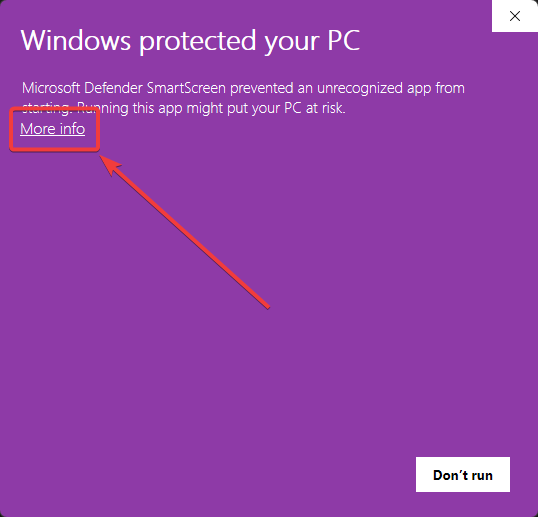
Click "More info"
When you see "Windows protected your PC", click the More info link to reveal additional options.
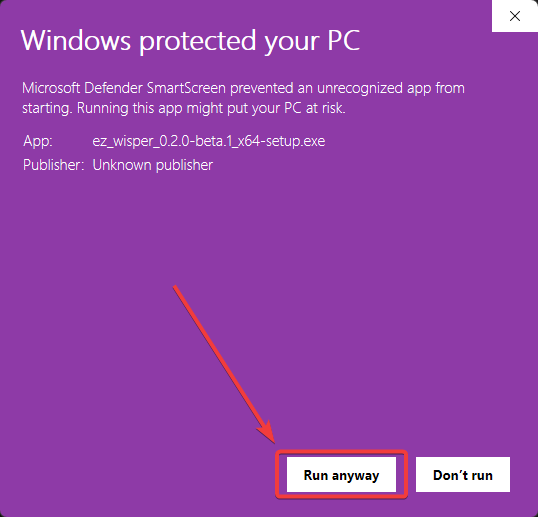
Click "Run anyway"
Click the Run anyway button to proceed with the installation. That's it!
🔒 Your security matters to us
EZ Wisper processes everything locally on your machine using Whisper AI. No audio or text is ever sent to external servers. As we grow, we'll obtain official code signing to remove this warning entirely.